Not getting updates?

It seems I haven’t got any updates via F-Droid since March. I never use Wifi on this phone, details:

Moto G32
Android version 15
CalyxOS version 6.8.21

so in the F-Droid app, updates are set “Over data”, and even though it is et to Automatically install updates, the next setting states 4 March as the earliest next update. When I press updates in F-Droid app it states apps are up to date.

Taking a look at one app Fairemail the version is 1.2262 yet FairEmail | F-Droid - Free and Open Source Android App Repository states version 1.2289 . Version 1.2262 came out in Jan 31st, see Release 1.2262 Barsboldia * · M66B/FairEmail · GitHub

Can I somehow force on update from F-Droid ? Have looked for update logs.

@M66B

Over data is set all the way to the right to Always?

1 Like

Yes, correct. I’ve since looked at F-Droid; seems there are two types, a basic one and another. Not sure how to check which one I’m using.

Re the ‘over data’, I use 4G not wifi, however hardly ever have the 4G on. That said it has been on for an hour or so, and no updates ? i did try a reboot.

No, in F-Droid, Settings, Updates, Over data slider is all the way to the right, to Always?

Update interval is set to 1h? or?

attach a screenshot

1 Like

Yeah, we’ve seen this happen on devices that kill apps

now, go to the Latest tab, and do a pull-to-refresh gesture so you force a Manual update

Update all the apps, as needed, F-Droid included

then test for a couple of days (it takes like 5 days for a new index to be published so see if you got any updates in 7-10 days)

1 Like

Oh wow, thanks, now there are 28 updates. Thanks for your help.

You seem using full version. “Nearby” icon is the clue. I prefer basic version, I don’t need to share apps to nearby services.

1 Like

This is still happening, no updates at all. I have to do the “pull-to_refresh” gesture to force the update.

No idea on what’s broken.

Calyx should be fine (this issue aside: A letter to the CalyxOS community I mean) and it is fine on other Pixel devices I’ve seen around. :person_shrugging:

1 Like

I’m not sure how often the app checks for updates ? I don’t use wifi, and the 4G/data is only used intermittently, when I go to check for emails. So, if the ‘window’ is smaller than the frequency that f-droid checks, then I won’t get updates will I ?
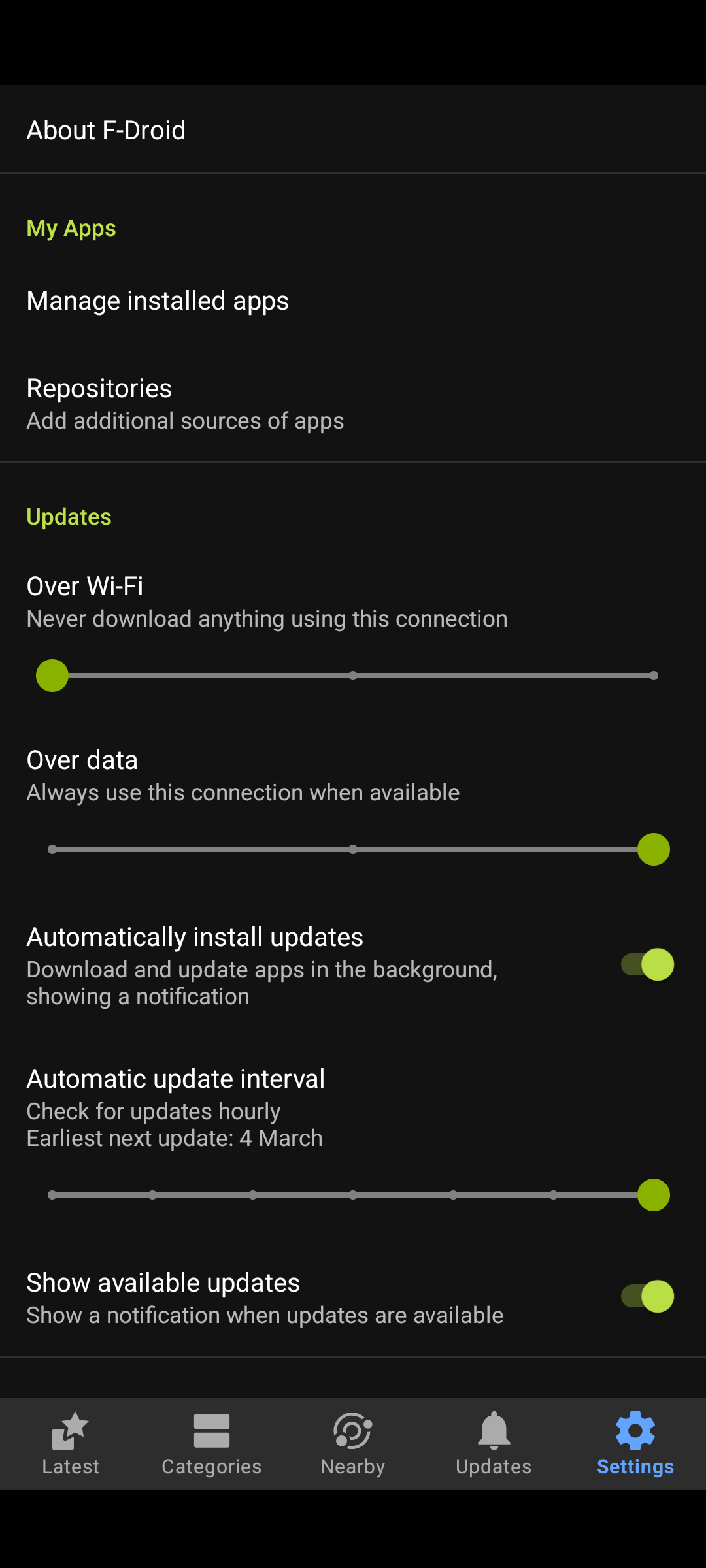
It is as you set it, trigger it manually if auto does not work for your usecase

1 Like

A friend informed me of a possible workaround ..

Yes you just need to clear the app’s storage

Tap & hold F-Droid app
Go to app details (i)
Go to storage and cache.
Tap Clear Storage.

This should reset the app

Have done so. :smiley:

This topic was automatically closed 60 days after the last reply. New replies are no longer allowed.