I’m trying to write the build metadata for an app. The build works with “fdroid build” locally, but fails in the GitLab workflow, and I can’t debug the error because the logs get capped by GitLab:
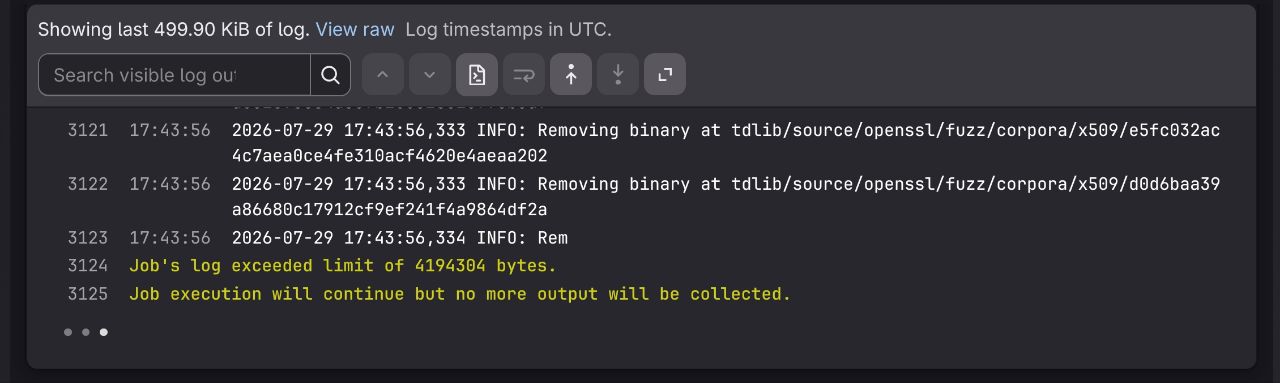
How am I supposed to proceed now?
Link to your pipeline, recipe, etc?
Fix other failed jobs first. If build still fails after that try to make its logs less verbose so you don’t spam the log too much before the failing part 
to be fair, looks like the scanner cleaner is pretty busy, and that can’t be made quiet
will run locally soon
The other failing jobs are mostly trivial things (like lint/yaml formatting issues), which I plan to resolve once I get an actual APK to compile.
The other less trivial issue blocking me is the F-Droid scanner flooding the workflow log with so many deletion messages that it exceeds GitLab’s log limit. Because of that I can’t view the logs from the actual APK compilation, which fails later in the pipeline.
@licaon_kter So what would be the proper course of action in this case? In my view there are three options:
#1. fdroidserver implements a metadata field that allows temporarily disabling the logging scandelete performs, #2. I replace the submodules inside the repository (which is where most of the binaries came from) with copies hosted elsewhere, but with the binary files removed beforehand or, #3. I delete the binaries myself before the build (does prebuild or some other stage run before the scanner?).
I honestly don’t want to go with option #2, since some of the binaries aren’t inside a single submodule, but rather inside a tree of submodules nested within other submodules, who knows how deep. Maintaining that in the long run would be hell.
Maybe make a temporary branch where you delete the binaries and try to build from that to find the source of the issue?
You can use
    rm:
      - path
As said above to clean up stuff before prebuild & scanner are run